


WhatsApp for clinics
A WhatsApp chatbot for clinics that books into your calendar
HeyCAi is an AI receptionist for health clinics. Its assistant, CAi, answers your clinic’s WhatsApp at any hour. It replies to questions about your services and opening hours, and books, moves or cancels appointments in your calendar while the patient is still in the chat.
 Your clinic online
Patient: Hi! Do you treat running injuries? My knee has been sore since Sunday.
Your clinic: Hi Sam. Yes, our physiotherapists treat running injuries. Would you like a first visit this week?
Patient: Yes please, Thursday after work if you can
Your clinic: On Thursday I have 18:15 or 19:00. Which suits you?
Patient: 18:15
Your clinic: Booked: Thursday at 18:15 with Laura. The details are in this chat, and I’ll remind you the day before.
 Official WhatsApp Business API
What it answers
What your patients ask on WhatsApp, answered
CAi answers from the clinic information you approve when you start: services, prices, opening hours and policies. If it doesn’t know something, it doesn’t make it up.
The everyday questions
The same ones your front desk answers all day, now answered in seconds.
- Where are you exactly? Is there parking nearby?
- Are you open on Saturdays?
- How long is a first visit, and what should I bring?
- Do you treat plantar fasciitis?
- How much is a session?
At any hour
It replies straight away, in the evening and at weekends too, without anyone on your team checking their phone.

Languages
CAi answers in Spanish and English. It picks up the patient’s language from the first few words.
When a person is needed
CAi doesn’t guess. Anything clinical, and anything it doesn’t know, goes to your team the way you’ve set it up.
What it never does
- Give clinical advice or a diagnosis.
- Make up an answer it doesn’t have.
- Follow-up
- First visit Booked on WhatsApp
- Follow-up Moved from Thursday on WhatsApp
- Free again Cancelled on WhatsApp

Your calendar
Booking on WhatsApp, straight into your calendar
When a patient asks for an appointment, CAi checks your live calendar, offers slots that are really free and books the one they pick. Moving or cancelling works the same way, in the same chat.
CAi books directly into PracticeHub and QuiroHiro, and into other calendars such as Cliniko, Jane App or Google Calendar.
Phone and WhatsApp book into the same calendar, so there are no double bookings.
After the booking
Confirmations and reminders, in the same chat
The confirmation, the reminder and any change of plan happen in the thread where the patient booked. Every reply goes straight into your calendar.
-
As soon as they book
The confirmation
The booking confirmation goes out on WhatsApp with what the patient needs to know before the visit: what to wear, what to bring and how to find you.
You’re booked for Thursday at 18:15 with Laura. Wear comfortable clothes. The entrance is on the side street.
-
Before the visit
The reminder
CAi asks the patient to confirm and chases the ones who haven’t replied.
A reminder of your appointment tomorrow at 18:15. Reply to confirm, or tell me if you need to change it.
-
If plans change
Moving it by reply
The patient says what suits them and CAi offers slots that are really free. It never offers one that isn’t.
I have Friday at 9:00 or Monday at 17:30. Which works for you?
-
When a slot comes free
The waiting list
When a patient cancels, CAi offers the free slot to the patients on your waiting list and books the first one who says yes.
A slot has opened up tomorrow at 17:00. Would you like it?
The waiting list, the reminder calls and the rest: WhatsApp appointment reminders
Before you switch them on, measure where you start: how to calculate your no-show rate
Chatbot or assistant
A WhatsApp chatbot that reads what patients write
Many WhatsApp bots run on a menu: the patient picks option 1, 2 or 3 and follows a fixed path. CAi starts from the message itself, written the way the patient would write to your front desk.
A button menu does the job when the questions are few and always the same: the address, the opening hours, a link to book online. It runs out when a patient puts a question and a date in the same message.
AI receptionist or chatbot: the full comparisonA button-menu bot
ClinicPatient: Hi, anything on Thursday after work? My knee is sore
Bot: Welcome! Reply with a number:
1 Book an appointment
2 Opening hours
3 Prices
4 Something else
Patient: 1
Bot: Choose a service:
1 First visit
2 Follow-up
CAi
Your clinicPatient: Hi, anything on Thursday after work? My knee is sore
CAi: Sorry to hear that. On Thursday I have 18:15 or 19:00 for a first visit. Which suits you?
Patient: 18:15
CAi: Booked. See you on Thursday!
| Point | Button-menu bot | CAi |
|---|---|---|
| What the patient does | Picks a number or a button at each step. | Writes as they would to a person. |
| Booking | Whatever the flow allows: a link, a form or a fixed set of steps. | Checks your live calendar and books, moves or cancels in the chat. |
| A question nobody planned for | Back to the menu, or “please call us”. | Answers from your clinic’s information, or passes it to your team. |
| Setting it up | Someone writes every branch of the flow and keeps it up to date. | We set it up with your clinic’s information, and it doesn’t go live until you’ve tested it and signed it off. |
For your team
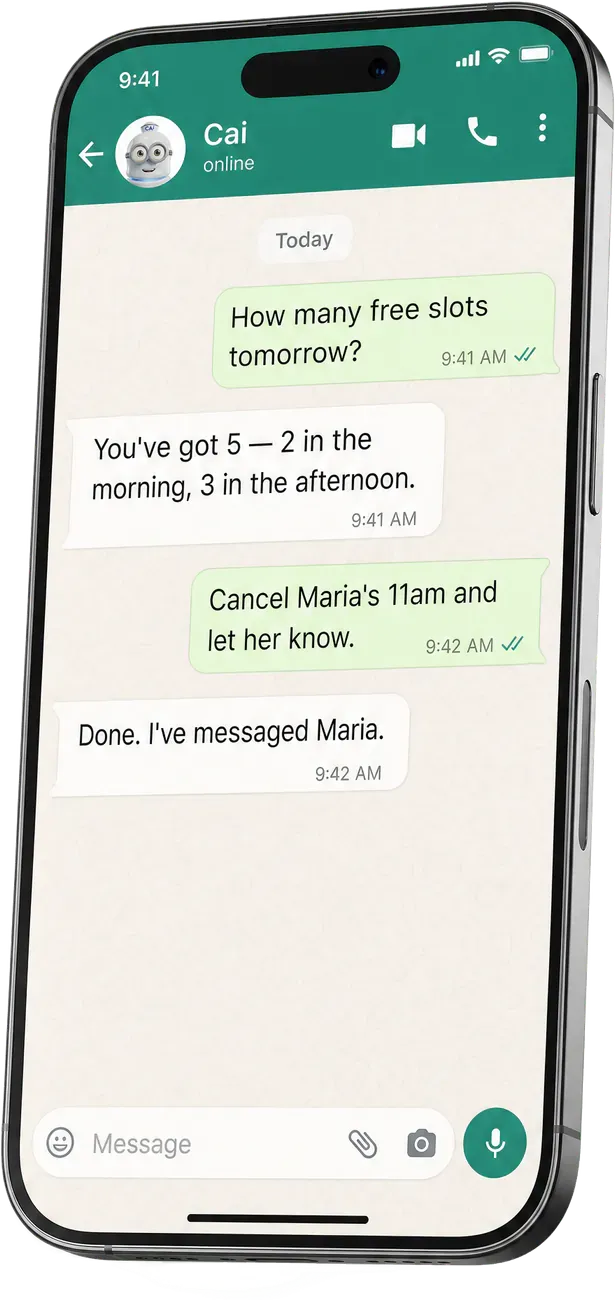
Your team gets its own assistant on WhatsApp
The same assistant works for you and your staff, in your own WhatsApp. Ask it about the clinic, ask it to do something, and it tells you what needs your attention.
-
Ask
It answers straight away, without opening the software.
- “How many openings do I have tomorrow?”
- “When is Juan’s next appointment?”
-
Act
It does it on your behalf, in your system.
- “Cancel Maria’s appointment and let her know.”
- “Send tomorrow’s reminders.”
-
Alerts
It messages you before you have to ask.
- Every morning, a briefing with your calendar, alerts and to-dos.
- Patients who have been away too long.
Both plans include it, and there’s nothing to install: it’s a chat like any other.

Patient data
What happens to your patients’ messages
Under the GDPR, a WhatsApp thread about an appointment can count as health data. This is how HeyCAi handles it.
How we look after your data GDPR guide for voice and WhatsApp at clinics
-
The official WhatsApp Business API
We use the official WhatsApp Business API. We handle the message templates and their approval: your team has nothing to do.
-
Your clinic decides
HeyCAi is the data processor; your clinic is the data controller. CAi only messages your patients about their care at your clinic, and you choose which messages go out.
-
Only what it needs
To answer and book, CAi only uses availability, services, practitioners and basic patient details. Clinical records, SOAP notes, diagnoses and payments stay out.
-
GDPR
We comply with the General Data Protection Regulation (GDPR). A data processing agreement (DPA) is available: ask for it at privacy@heycai.ai.
Keep reading
More of what HeyCAi does for your clinic
- WhatsApp appointment reminders Reminders patients answer, rescheduling by reply and a waiting list that fills cancelled slots.
- After-hours calls What CAi does with the calls that come in at lunchtime, in the evening and at weekends.
- Clinic answering service For your calls: a medical answering service, a phone menu and CAi, compared.
- Appointment software PracticeHub, QuiroHiro, Cliniko, Jane App, Google Calendar and Organízate, and what happens with the rest.
Questions
Frequently asked questions

Setting up WhatsApp reminders on your own? Our guide explains the app, the API and the templates.
WhatsApp reminders: the guide Does CAi answer from our clinic’s WhatsApp?
Yes. CAi replies from your clinic’s WhatsApp account, in the tone you use with your patients. For the set-up, your clinic provides a WhatsApp Business account. We use the official WhatsApp Business API. We handle the message templates and their approval.
Does it work with our appointment software?
CAi books directly into PracticeHub, QuiroHiro, Cliniko, Jane App, Google Calendar and Organízate. Phone and WhatsApp share the same calendar, so there are no double bookings. Using something else? We look at it with you on the video call. The details for each one are on our integrations page.
What if a patient wants to talk to a person?
CAi passes it on. When something falls outside what CAi knows, it puts the call through to you or to an on-call number, or takes a message and alerts your team on WhatsApp, whichever you prefer. It never gives clinical advice either: questions about a treatment go to your team.
Is a WhatsApp chatbot allowed under the GDPR?
The GDPR doesn’t rule it out, but it sets conditions. A WhatsApp thread about an appointment can count as health data, so you need a legal basis, a processing agreement with your provider and a clear notice for patients. We comply with the General Data Protection Regulation (GDPR). HeyCAi is the data processor; your clinic is the data controller. Our GDPR guide goes through each step.
How much does it cost?
The plans and an estimate for your clinic are on our Pricing page. There’s a WhatsApp plan, which includes the team assistant, and one that adds calls. We confirm the exact price on the video call. You start with a 30-day free trial. No lock-in: cancel whenever you like from your dashboard.
Do patients need to install anything?
No. Patients use the WhatsApp they already have, and so does your team. CAi connects to your appointment software behind the scenes.
Which languages does it answer in?
CAi answers in Spanish and English. It picks up the patient’s language from the first few words, whether they write in Spanish from Spain or Latin America, or in English from the UK or the US.
How is it different from a WhatsApp bot with buttons?
A button bot follows a fixed menu. CAi reads what the patient writes, checks your live calendar and books, moves or cancels the appointment in the same chat. If something falls outside what it knows, it passes it to your team.
Live demo
Hear how CAi talks to your patients
The demo is a call: give us your clinic’s website and your mobile, and CAi rings you with your clinic’s services and opening hours. It’s the quickest way to hear how it talks to patients.
- Type your clinic's website and your mobile.
- CAi reads your website and gets ready as your reception.
- It calls you: answer as if you were a patient.
- The demo is free: no card, no sign-up, no commitment.
- Your phone rings in about 30 seconds.
After the demo
Book a video call with Josep